Remote monitoring on a date coding line means the coder publishes its own state: which message is running, how many items have passed, what fault stopped the belt, and how much ink and solvent remain. On multi line plants this visibility replaces a walk to the far end of the building with a glance at a dashboard, and on night shifts it replaces discovering a stopped coder at six in the morning. The capability is real, and it is also easy to buy badly: dashboards get demoed, network realities surface at installation, and nobody asked where the alerts actually go. This guide walks the six questions that separate a monitoring setup your team uses from one it ignores.
Key takeaways:
Remote monitoring is visibility, not control of the line. It reports status, counts, faults and fluid levels; a person still mounts heads, refills ink and clears jams.
Connectivity comes in three flavors. USB, RS485 and Ethernet ports on the coder decide what integrates with your existing line controls and what stays standalone.
Backups and power failure behavior matter on the floor. USB one-key backup and settings memory that survives a power cut turn a dead controller from a crisis into a swap.
Your network policy decides the architecture. Air gapped plants, wifi free zones and cloud dashboards need agreeing before the purchase order, not after.
The payoff shows up in fleet operations. Multi line and multi shift plants gain hours; a single coder on one day shift gains little.
A connected coder reports the things an operator would check by walking up to it. Machine status and the running message, print counters against the shift target, fault states with codes rather than silence, and on fluid monitoring machines the ink and solvent condition, so a refill becomes planned work instead of a mid shift stop. Flagship class machines put this behind a seven inch HD touchscreen with a drag and drop message editor, so the local interface and the remote view tell the same story.
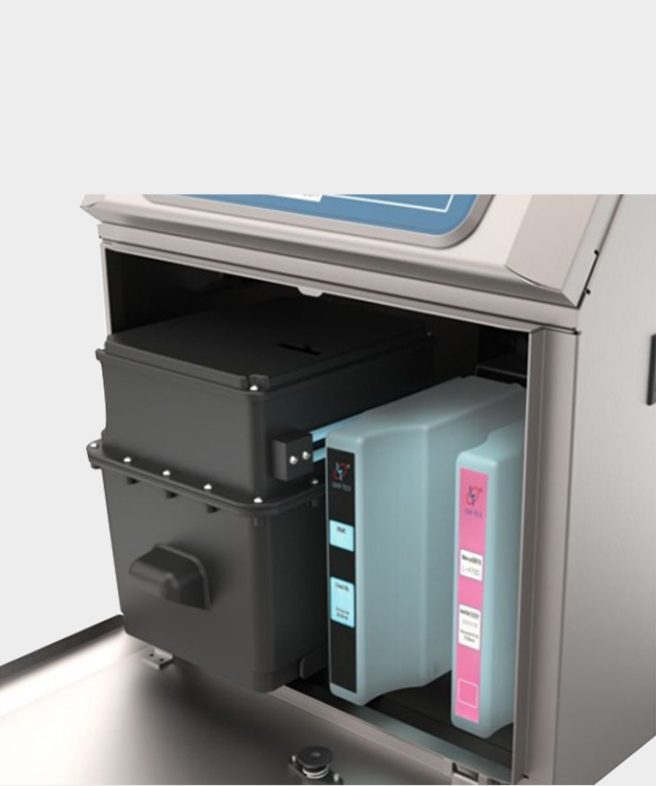
What monitoring watches: the fluid compartment. Ink reservoir and makeup cartridge levels report to the controller, so a refill is planned work instead of a mid shift stop.
Fluid level reporting deserves the emphasis. On machines built for harsh duty, ink condition monitoring doses make-up fluid only when viscosity drifts rather than on a fixed timer, which trims additive consumption by as much as half, and the same telemetry that saves additive also tells the dashboard a refill is due before the head runs dry. Consumption data accumulating shift by shift is also how a plant proves whether a line is actually running the ink volume the supplier quoted.
| What the coder reports | What the plant does with it |
|---|---|
| Running message and status | Confirm the right code is on the right line without walking there |
| Print counters | Track shift output, reconcile against the packaging count |
| Fault codes as they occur | Route the right person with the right part, before the queue backs up |
| Ink and solvent condition | Plan refills, prove consumption, catch dosing drift |
| Service and run hours | Put maintenance on the calendar with evidence |
None of this is speculative technology. It is the same telemetry pattern plants already run for fillers and case packers, arriving late to coders because coders used to be the dumb box at the end of the conveyor.
The honest boundary first: monitoring does not operate the machine. It cannot align a print head, refill a reservoir, clear a blocked nozzle or change a message on its own. When a coder faults at two in the morning, the dashboard tells you which fault, and a person still goes to the line. Plants that buy monitoring expecting head count reductions are usually disappointed; plants that buy it expecting faster, better informed responses are not.
There is a second boundary worth stating plainly. A monitored coder produces data, and data only pays when someone is designated to look at it. A dashboard nobody opens after installation week is an expense, not a capability. Decide who receives alerts, on what schedule the counters get reviewed, and what the escalation path is when a fault repeats. These are work design questions, and they belong on the same checklist as the technology.
Under the dashboards, integration is ports and protocols, and the coder's port list decides which of your systems it can talk to. Production class machines carry USB, RS485 and Ethernet: USB for local backup and data offload, RS485 for the serial fieldbus that older line controls and PLC installations still speak, and Ethernet for the plant network, the cloud connection and modern MES integrations. The controller itself runs an embedded LINUX system, which is what allows the same machine to present a local touchscreen, a serial interface and a network presence without a separate industrial PC per line.
Ask for the protocol documentation, not just the port list. What the machine speaks over RS485, whether the Ethernet side exposes a documented interface or only a proprietary dashboard, and whether message selection can be driven from the line PLC are questions with different answers per vendor, and the answers decide how much of the integration is configuration versus custom engineering. A supplier who hands over the interface document before the purchase order is signaling that integration is a solved problem for them.
One more integration habit from production floors: message libraries. Machines in this class store dozens of message templates so a product changeover recalls a saved message instead of re-entering it, and a supervised changeover, one person updating the template centrally rather than three shifts typing at the coder, is where monitoring quietly pays even without a single automated integration.
Electrical events happen, and how a coder behaves around power cuts is a floor reliability question, not an IT question. Two behaviors separate the thoughtful designs from the rest. Settings memory that survives a power failure means the machine comes back with its messages and configuration intact rather than blank. USB one-key backup means the entire message library and configuration ride off the machine onto a stick in one action, so a configuration mistake, a controller swap or a second identical line can be restored in minutes.
The operational habit is boring and worth it: back up at every message change, label the stick with the date, and keep the previous generation. Plants that adopt this routine stop re-keying messages after upsets, and the backup stick becomes the migration path when a line is duplicated or a controller reaches end of life.
| Reliability behavior | What it protects |
|---|---|
| Power failure settings memory | The line restarts with messages and configuration intact |
| USB one-key backup | The whole message library moves off machine in one action |
| Restore to a second machine | Duplicating a line or swapping a controller is minutes, not a shift |
| Fault code history | Repeating faults become evidence, not anecdotes |
The questions that stall monitoring projects are organizational, not electronic, and they are cheap to answer early and expensive to answer late. Where does the coder sit on the network: on the plant network behind your firewall, on a segregated production VLAN, or on its own isolated segment with no route to the internet at all? What is the plant policy on cloud services, and if a vendor dashboard is in scope, where is the data hosted and who owns it? How do alerts reach people: email, the dashboard, the line SCADA, or the maintenance radio, and who is on the distribution at three in the morning?
If the plant is air gapped by policy or by circumstance, ask what the machine does standalone. The honest answer is that the local value, touchscreen operation, stored messages, counters and USB offload, survives without any cloud at all, and the remote layer is an addition on top rather than a dependency underneath. A vendor who cannot describe the air gapped operating mode is a vendor whose demo assumed a network you may not have.
Put the answers in writing as acceptance criteria: connectivity options exercised, alert routing demonstrated, data ownership stated, air gap mode shown. Monitoring is exactly the kind of feature that demos beautifully and integrates painfully, and the writing is what keeps the two honest.
The arithmetic of monitoring follows lines and shifts. A plant with one coder on one day shift gains a fault code instead of a mystery and little else, and should size its expectations accordingly. A plant with a dozen coders across three shifts gains something different: faults surfaced as they occur, consumption tracked per line, maintenance scheduled on run hours instead of calendar guesses, and changeovers standardized through a supervised message library. The same feature scales from convenience to infrastructure.
The industries where this shows up in the catalog are telling: food and beverage, pharmaceutical, cosmetics and electronics, the plants where line counts are high, audits ask for records, and a coding stop is measured in queued product rather than idle minutes. If your plant matches that description, the monitoring conversation belongs in the first vendor call, not the punch list.
Not necessarily. Ethernet, RS485 and USB ports support local and plant network operation without internet, and machines in this class run fully standalone with touchscreen operation, stored messages and USB backup. Cloud dashboards add off site visibility on top, where plant network policy allows them.
Yes. The local operating value survives air gapping, and the RS485 serial interface integrates with line controls with no route to the outside. Ask the vendor to demonstrate the standalone mode as part of acceptance, since a demo that assumed connectivity is not proof.
On machines designed for production floors, settings memory survives a power cut, so the coder restarts with its message library intact. USB one-key backup adds the belt and suspenders: the full configuration rides onto a stick in one action and restores to the same or another machine in minutes.
No. Monitoring reports status, counters, faults and fluid levels; a person still refills ink, clears jams, aligns heads and confirms the code. What it replaces is the walk to the line to learn those facts, and the discovery delay when something stops unattended.
Multi line and multi shift plants in food, beverage, pharmaceutical, cosmetics and electronics see the payoff, because fault surfacing, consumption tracking and audit records multiply across lines and shifts. A single coder on one day shift gains convenience and modest fault clarity, and should size expectations accordingly.
Remote monitoring earns its place when the six answers line up: reports worth reading, boundaries respected, interfaces documented, backups routine, network agreed, payoff matched to plant scale. NANO MARK equips production coders with the touchscreen, connectivity and backup behaviors discussed here, and the team answers network and integration questions with interface facts rather than demos. Send your line count, shift pattern and network policy through the contact page and ask what monitoring would look like on your floor. The small character coder range and the wider inkjet printing machine range are on the site for comparison.
Contact: Jason
Phone: +8613337336942
E-mail: [email protected]
Add: Hangzhou City, Zhejiang Province, China